Settings
Configuration > AI > AI Media (/admin/config/ai/ai-media), with
the Administer AI Media permission. Every key is also commented in
config/install/ai_media.settings.yml, so it can be set in a recipe or with
Drush (drush cset ai_media.settings <key> <value>).
The tabs follow the tasks an administrator comes to do: Generators, Editor options, Name, title and alternative text, Safety, Site context, Description, Advanced. A site installed from an earlier version may lack newer settings; AI Media reads the shipped default for each missing one, and the form shows it, so saving the form stores it.
Generators
The first tab: what editors see.
Media Library tabs
| Setting | Key | Default | What it changes |
|---|---|---|---|
| Offer the AI tabs in the Media Library | tabs_enabled |
on | Off hides every AI tab for everyone. An AI tab link opened anyway says generation is not offered. |
| Where should the AI tabs appear? | tab_position |
inside |
inside: a switch at the top of the media type's own tab, "Upload | Generate with AI" ("Add" for Video). after_type: each AI tab right after the tab of its generator's media type (Generate image with AI after Image, Generate SVG with AI after SVG Image). end: after all other tabs, in the generators' order. |
| Show a "New" badge on the AI tabs | show_new_badge |
on | The badge on each tab, cleared once opened. |
Generators table
A draggable table lists the generators: choose the Media type each one saves into (only types with its source and a field that takes its files are listed; None means no tab and no generator), tick Enabled to offer one, clear Media Library tab to offer it only on core's Add media page and the Generate media with AI button, and drag to set the order of the AI tabs. Below it, one table per generator lists its formats: Enabled, Default (preselected for editors), the order, and Accepted by, which says which media type fields accept the format and links to the field settings when one does not. Editors only see formats that are both enabled and accepted by the field, and a format the field refuses is caught before any provider call.
| Setting | Key | Default | What it changes |
|---|---|---|---|
| Media type | generators.<id>.media_type |
image, svg_image, video |
The media type the generator saves into and whose tab its AI tab follows. Empty, missing on the site or no longer compatible: no tab and no generator. One media type holds one generator. Settings saved before this key existed read the default. |
| Enabled | generators.<id>.enabled |
on, Video off | Off shows no tab and refuses to generate. Video is experimental, so it starts off. A generator added later by another module counts as on. |
| Media Library tab | generators.<id>.tab |
on | Off keeps the generator, without its Media Library tab: editors use it from Add media and Generate media with AI. Missing counts as on. |
| Order | generators.<id>.weight |
image, SVG, video | The order of the AI tabs. |
| Formats | generators.<id>.formats.<ext> |
all on | Image: png, jpg, webp. SVG: svg. Video: mp4. |
| Default format | generators.<id>.default_format |
png, svg, mp4 | Preselected under Options. |
| Image quality | quality |
auto |
Sent only when the image model has a quality option. |
| JPEG and WebP compression | output_compression |
100 | Sent only when the image model has this option. |
AI Prompts
What AI Media asks the AI for is not fixed in code: each request uses an AI
Prompt of the AI module (Configuration > AI > Prompts, with the
Manage AI prompts permission), picked on the settings page with the AI
module's own prompt picker. The module ships one prompt type per use and a
default prompt for each, with the text AI Media used before. Variables in
braces are filled in by AI Media. A generator from another module adds its own
use with the prompt key of its definition.
| Use | Setting | Prompt type | Variables | Default prompt |
|---|---|---|---|---|
| SVG drawing (system prompt) | prompts.svg |
ai_media_svg |
{width}, {height} (required) |
ai_media_svg__default |
| Animated SVG, added to the SVG prompt | prompts.svg_draw, prompts.svg_css, prompts.svg_smil |
ai_media_svg_motion |
none | ai_media_svg_motion__draw, __css, __smil |
| Image and video frame | prompts.text_to_image |
ai_media_text_to_image |
{description} (required), {context} |
ai_media_text_to_image__default: the description as written |
| Ask AI for a name, alt or title | metadata.<target>.prompt |
ai_media_metadata |
{request} (required), {result_excerpt}, {max_length} |
ai_media_metadata__name, __alt, __title |
A prompt can change what is asked, never what is kept: SVGs are always sanitized (no scripts, no event attributes, no remote references), whatever the prompt says. A chosen prompt that has been deleted falls back to the shipped one.
Providers
AI Media has no provider setting: each operation uses the AI module default. See Providers.
Editor options
What editors may choose under Options, per generator. Everything is hidden by default, so the form is just the description and Generate; a hidden option uses the site default. The description always says which provider it is sent to.
| Option | Key | Generators | When shown |
|---|---|---|---|
| Provider and model | editor_options.<id>.models (show, allowed) |
all | A select of the allowed "provider__model" pairs (none ticked allows all the AI module lists), with the AI module default preselected |
| Size | editor_options.<id>.size (show, allowed, default) |
image, SVG, video | Square, landscape or portrait, matched to the closest size the model lists; hidden uses the default |
| Quality | editor_options.image.quality.show |
image | Hidden uses the image quality on the Generators tab |
| Format | editor_options.<id>.format.show |
all | Hidden uses the default format (or the first one the field accepts) |
| Style | editor_options.svg.style (show, default) |
SVG | Static, or animated: draw the strokes, CSS keyframes or SMIL (SVG and animated SVG); hidden uses the default, Static |
The tab also holds the cost line: Say "Each press is a paid request to …"
under Generate (cost_notice.enabled, on) and Providers that cost nothing
(cost_notice.free_providers, echoai), provider plugin IDs for which the line
is not shown. AI Media shows no prices: the AI module has none to give.
Every submitted model, size, quality and format is checked again on the server
against these lists, so a forged request cannot reach a hidden option or a model
that is not allowed. Set them in a recipe with simpleConfigUpdate, for example
editor_options.image.size.show: true.
Name, title and alternative text
For the media name, the image alternative text and the image title (when the image field has titles on), choose how each is filled:
- From the description: the description, tags removed, cut to the maximum length.
- Ask AI after generating: one more request, which costs credit. Images go to the chat with image vision provider; SVGs to the chat provider, with the description and the start of the result. Without that provider it falls back to the description, and the form says so. Each value has its own AI Prompt (see below).
- Use the AI Image Alt Text button (alternative text only, when the AI Image Alt Text module is enabled): its "Generate with AI" button stays on the alternative text in the review step, with its own settings and provider.
- Leave empty: the editor writes it. An empty name falls back to the file name.
| Setting | Key | Default |
|---|---|---|
| How each is filled | metadata.<name\|alt\|title>.source |
name and alt written by AI from the result, title empty |
| AI Prompt | metadata.<target>.prompt |
ai_media_metadata__name, __alt, __title |
| Maximum length | metadata.<target>.max_length |
80, 512, 255 |
Safety
AI Media adds no guardrails, moderation or validation rules of its own. It uses the site's, from the AI module:
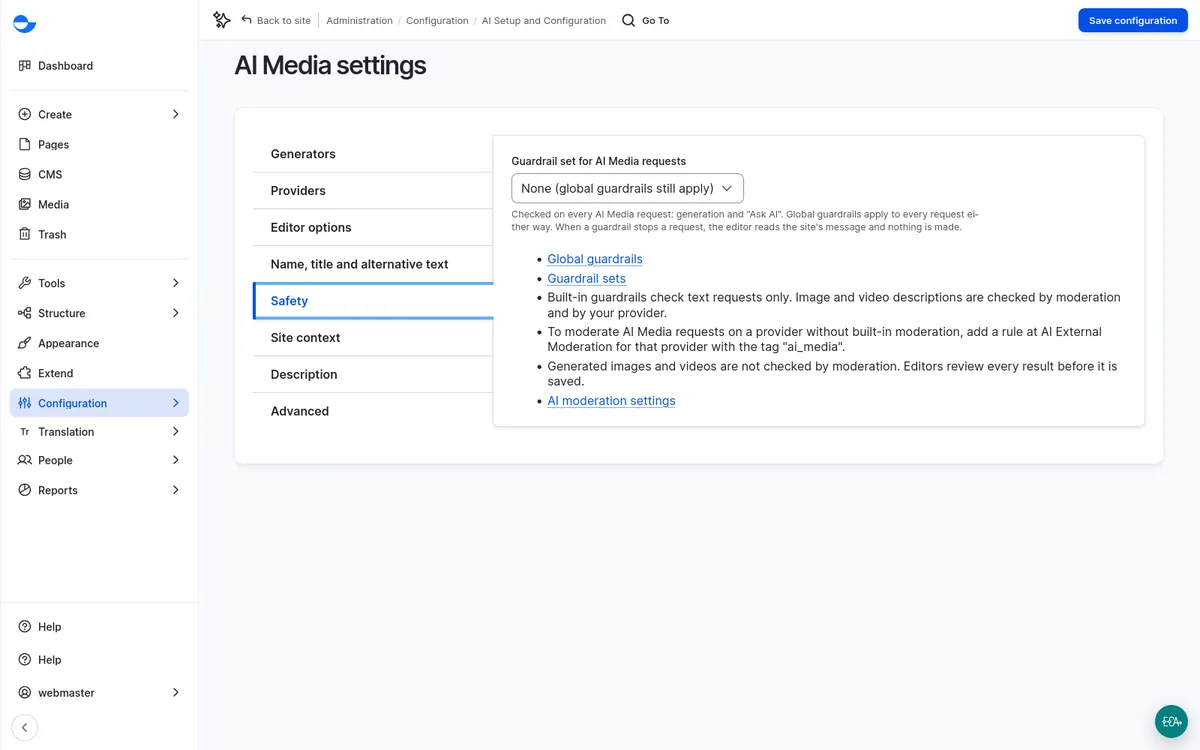
| Setting | Key | Default |
|---|---|---|
| Guardrail set for AI Media requests | guardrail_set |
none |
- Guardrail set: one of the site's guardrail sets
(
/admin/config/ai/guardrails/guardrail-sets), attached to every AI Media request, generation and "Ask AI" alike, as AI Agents and AI Automators do. None still leaves the global guardrails (/admin/config/ai/guardrails/global), which the AI module adds to every request. When a guardrail stops a request, editors read the site's message and nothing is made. - What is checked: the AI module's built-in guardrails check text (chat) requests only: SVG and "Ask AI". Image and video descriptions are checked by moderation and by the provider.
- Moderation: to moderate AI Media requests on a provider without built-in
moderation, add a rule at AI External Moderation
(
/admin/config/ai/ai-external-moderation) for that provider with the tagai_media. - Results: generated images and videos are not checked by moderation. Editors review every result before it is saved. To check saved images against a rule, add an AI image constraint from AI Validations to the media type's image field; it costs one more AI request per save.
Site context
Site context comes from the AI Context module (Context Control Center) 1.0.0-rc1 or later. Enable it; without it, or with an older AI Context release, the tab says what is missing and generation runs without site context.
AI Media registers an AI Media consumer type in Context Control
Center, with one consumer per generator (ai_media:image, ai_media:svg,
ai_media:video) and one per "Ask AI" request
(ai_media:metadata_name, _alt, _title). What each consumer gets (its
scope subscriptions, limits, selection mode, and whether context is pushed)
is set there, not in AI Media:
- Chat requests (SVG, "Ask AI"): AI Context pushes the context into the system prompt. AI Media adds nothing to the prompt itself.
- Image requests (image, video frame) are not chat, so AI Media pulls the
context for that generator's consumer and puts it in the
{context}of the image prompt (see AI Prompts).
AI Media still adds an AI Media generation value to AI Context's use case scope, which consumers can subscribe to. Editors see "Uses site context: N items" for an image, "Uses site context." for a chat generator, and "Used site context." on the result; never the items. AI Context 1.0.0-rc1 records usage for pushed requests, not for pulls.
| Setting | Key | Default |
|---|---|---|
| Use site context from Context Control Center | ai_context.enabled |
on |
Off declines every AI Media request in AI Context and pulls nothing.
Description
| Setting | Key | Default | What it changes |
|---|---|---|---|
| Maximum length | description_max_length |
1000 | The description field's limit, checked again on submit. |
| Example descriptions | description_examples.<generator> |
8 per generator | Offered under Examples, beside the description, one per line, up to 8. Empty shows no Examples button. |
| Offer a microphone beside the description | speech_to_text.enabled |
off | A Dictate button that adds what is said to the description. |
| Dictation language | speech_to_text.language |
browser |
browser, site (the page language) or a BCP 47 tag. |
The microphone uses the browser's own Web Speech support: this site sends nothing anywhere and needs no key. The browser may still do the recognition in the cloud, which Chrome and Edge do, so the audio leaves the machine through the browser. That is why it is off by default. A browser without speech support shows no button.
Advanced
Settings that rarely need a change: the files below, and Remove HTML tags
from the description before it becomes a name, title or alternative text
(strip_tags, on).
Files
| Setting | Key | Default | What it changes |
|---|---|---|---|
| Keep unsaved results for | unsaved_lifetime |
6 hours | Cron removes a result never saved after this time: 15 minutes, 1 hour or 6 hours, which is how long the site keeps temporary files anyway. |
| Maximum file size | max_filesize |
empty | A larger result is refused before it is saved. The field's own limit also applies; the smaller wins. |
| File directory | file_directory |
empty | A folder under the field's upload destination, with tokens. Empty uses each field's own file directory. |
Recipes
A recipe that installs AI Media should import its config with
config: import: ai_media: '*': core installs a module's config entities, such
as the AI Prompts, only when the recipe imports them. Without that, AI Media
uses the shipped prompt texts and the settings page says the prompts are not
imported.
Every key works with core's simpleConfigUpdate. AI Media adds config actions
for the generators, all on ai_media.settings:
| Action | Value |
|---|---|
enableAiMediaGenerator |
a generator ID or a list |
disableAiMediaGenerator |
a generator ID or a list |
orderAiMediaGenerators |
generator IDs in tab order |
setAiMediaFormats |
generator ID to a list of formats: in this order, the first by default, the rest off |
config:
  actions:
    ai_media.settings:
      enableAiMediaGenerator: [image, svg]
      orderAiMediaGenerators: [image, svg]
      setAiMediaFormats:
        image: [webp, png]
      simpleConfigUpdate:
        metadata.alt.source: ai